
This is a quick cheat sheet for finding various tools on PDF Exchange:
- OCR
- Convert Tab, middle top
- Redactions
- Protect Tab, middle top next to Signatures box
- To Duplicate Redactions, click the redaction
- Then, click Duplicate under the Arrange tab of the Redaction Tools at the top
- or
- go to the Home tab, click Selection in the middle, and click Duplicate
- Signatures
- Protect Tab, middle top
- Bates Numbering
- Organize Tab, far right
- Exhibit Stamps
- Please let IT know if you'd like to do Exhibit Stamps
- Comment Tab, middle
- Export to Word
- Convert Tab, middle under Export
- Send Document in Email
- Share Tab, on the left
- Reorganize/Add/Remove Pages in PDF
- On the lefthand side click the pages icon to bring up Thumbnail View:
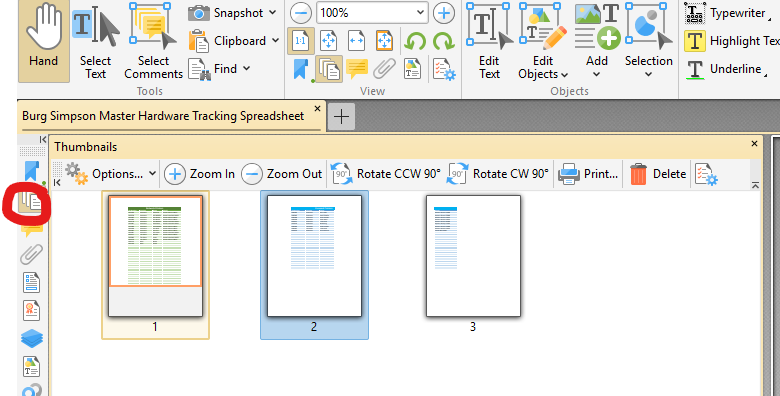
- In Thumbnail view you can change the order of pages, and add pages to/remove pages from a pdf
- If you want to add pages from another document, you can drag that document to the thumbnail view and drop it in to add the pages
- On the lefthand side click the pages icon to bring up Thumbnail View:
Quick How To's:
- How do I go back to regular functionality?
- Every tab still has "Hand" and "Select Text" on the left. Just click either of those:
- Every tab still has "Hand" and "Select Text" on the left. Just click either of those:
- How do I print to PDF:
- "Print to PDF" is replaced by a tab at the top called "PDF-XChange" and has a "Convert to PDF" button on the left:
- "Print to PDF" is replaced by a tab at the top called "PDF-XChange" and has a "Convert to PDF" button on the left:

